


In case of flight disorder or sideward flight, restore factory default settings will be help to restore the default gyroscope settings.
Resetting and calibrating the Syma X5C in four steps:
Step 1: Press the power switch to turn on the transmitter;
Step 2: Press the power switch to turn on the Syma X5C;
Step 3: When the aircraft indicator quickly flashing to slowly flashing, please push the throttle lever to the highest position, and then pull it back to the lowest position.
Then the quadcopter indicator changed from slowly flashing to normal lights up.
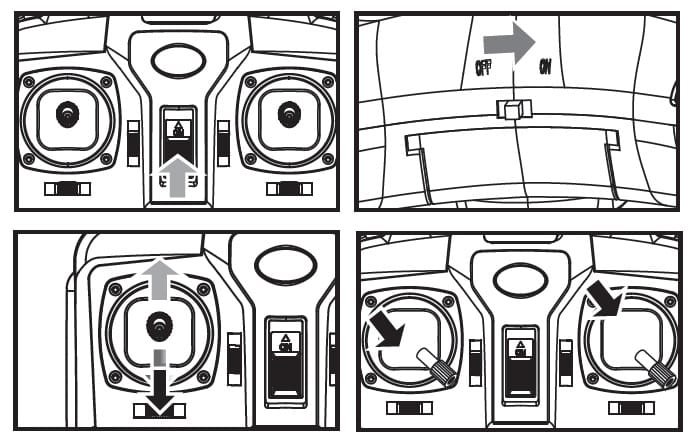

Step 4: Place the aircraft on a horizontal postion, then push transmitter both left and right lever to lowest right conner for about 2-3 second, indicator on the Syma X5c changed from normal lights up to quickly flashing; After 2-5 seconds, the indicator changed to normal lights, it means the quadcopter restarted /reset successfully.
When syncing your Syma X5c keep it in a horizontal position to start to a horizontal stable flight.


There are a lot of questions about the quadcopter not responding and the lights not changing on attempted recalibration or resetting, but I’ve yet to see a successful solution.
Is anyone monitoring this forum?
you should check the battery pack, but can be anything else….
My quadcopter will not operate at all. The lights flash on both the controller and the copter but it will not respond to any control. It is a new unit. Please help
I finally got my Syma X5SW from China. Is not normal that when I throttle it up, it instantly goes backwards and I need to “push it” forward to keep it in place?
Blades are installed correctly. I also tried to calibrate it, but didn’t notice any difference before and after it.
My Grandsons Syma X5C the rear blades spin slower than the front making the front to lift and slide the machine across the floor and not lift into the air any idea’s how to fix this problem
This calibration tutorial was hugely helpful and fixed my problems instantly.
Thank you!
Please help my syma x5 light stay on when I cut my from on,they never flash for me to pair with the Remote.the remote still beeps like it pairs but drone does nothing.any help would be appreciated
I have the x5sc and im having the same trouble. If u find any solution please let me know
Can someone please help me. I turn on my remote and my copter and both of their lights is blinking but i cant fly
Hello, I need your help I have got a syma X5C quad and one of my moter is dead or slightly slower can one please help me but I would prefer a email.. I’m only 13 so I might need a little extra tips
Thank you!
Could someone help me about my x5c?
As i turn on the copter, the lights are just stable. It does’nt have any response when i sync it to the transmitter.
My indicator light on syma x5sw controller doent work but or still flies the quadcopter. Whe is it not glowing.
Hi, flew my X5C once whithout crash it, after recharge the battery it does not blink the leds when power up quad, even when remote is off.
I switch quad on and off several times, recharve the battery longer but nothing.
I have a second X5C and it worksfine.
What could be the problem?
I assume that not only is the copter not blinking its lights on power on, but not coming on at all?
Sounds like the copter is not getting power. Check that the pins on the copter where the battery connects aren’t bent/broken.
What can you do if they are broken?
I just received a X5C and installed new Duracell batteries and the transmitter constantly beeps and the battery indicator in the LCD display flashes. I tried other batteries and they test fine, 1.6VDC each.
Is this a bad transmitter? What else should I check?
I believe one of the buttons is stuck. When I was playing around with what the transmitter would do if I powered it up with various buttons pressed, I believe it did what you describe.
I believe that was the mode button but could be the lower left trim pressed left.
Hi,
I bought a replacement Syma X5C-1 and I can’t get the remote to connect……the lights will respond to the binding……..but then nothing….help please
I just got my new x5c-1 in the mail and the lights wont stop flashing I cant connect controller to the quad copter can anybody help me with that?
I have the Syma X5SC, I had a few minor indoor crashes and now one of the props seem not to turn as fast as the rest and it will not lift off the ground. Thought it was a motor problem, so I replaced the two back motors. Not a power problem as I have fully charged batteries. At times it tips over from the other props spinning to take off and the back one doesn’t move enough for it. I did the recalibration with the remote (down to the right) and that seemed to make it worse. Not sure what else to do. Any ideas???
john check the small gears underneath the props should run true with large gears (even) hope this helps
Need a new remote for my x5sw explorer one. I see instructions on how to recalibrate but how do you sync a different remote? My buddy has same looking remote.
Will it work or what remote do i have to buy? Is there such a thing as syncing a brand new remote?
Newbie here. Thanks
For the record. I took mine on a trip with me and decided to take off the prop guards and props to avoid hurting anything while packed. It is imperative that you put the blades back on correctly or the quadcopter will not lift off. Use common sense when looking at the props and hit the remote to spin the cogs that hold them to see which go where. Two props spin one direction and the other two spin in the other. Make sure the props match when putting them on their two respective cogs, and if it doesn’t lift off, swap those to out with the other. I hope this makes sense.
My syma x5sc can not fly because balance not good I try to calibrated. I check when motor running if 1 of 4 motor log all motor shut off led flashing you must be reset, but 1 motor be log it not shut off. That the problem my coppter can not balance how should to do thanks
Good day!
I recently own a Syma x5c… I dont know how this happens but whenever I try going left the quadcopter goes to right and when i try to control instead of going right, it the quadcopter goes left.
Its in opposite direction but the up/down is normal… anyway or how to fix this please help me.
I just got this as a first quad-copter to start me out as a new hobby but when I tried to fly the LED indicators on the copter wouldn’t work when I switched it on even after I left the battery on the charger for about two hours…help
Hi,
My problem is that it is turning clockwise. I tried to calibrate it with the buttons below the left stick, but either it didnt work or the effect was to weak, because there is a limit of about 10 “calibration steps”. Any Ideas?
Can anyone tell me why my son’s x5c-1 doesn’t start? Charged all 4 batteries, nothing. Indicator lights don’t even turn on.
Please help, I live overseas.
I had a couple of problems, one of them was erratic flying, I found that the receiver board was only connected with 3 screws, and had worked its way out of balance, so I pushed it down and now it flys again. My other problem, is the camera, when I turn on the quad the camera lights up red and stays red, it will not record. Not sure the issue, any help would be appreciated.
I did replace motors on the quad, and they are easy to replace, and it doesnt matter if you buy CW or CCW motors, the polarity of the solder points creates the motor direction.
Hi. I got the same issue with the camera: lights up red and stays red. No recording. Anyone got a clue? Thanks.
Do you have a micro SD in it. .. this is what happens when I forget to put mine back in. ..
I have one SD card in it. I even formatted and changed that card but still no green light.
Same issue here, red camera light stays on.
When I format the SD, and put it back into the camera, a video and image folder is created, so the camera recognizes the SD card I would say.
Could it it be that there is a problem with the wifi connection between camera and the remote?
Any solutions so far?
My eleven year old son received a Syma x5c-1 for his birthday a few weeks ago and it worked perfectly.
He decided to clean it last night and he took off the propellers, wiped them clean and reinstalled them. It would only lift off the ground on one side, so I found that he had put the propellers on incorrectly.
I fixed the propellers and now it will not lift off the ground at all. Can anyone walk me through what I can do to make his very favorite birthday present work again?
Thank you!
Are you sure you have installed the blades on correct order? If your standing behind your Syma (you can read Syma and it’s not upside down), the blades go as follows, the front blades have the warning sign on the outsideof the quad-copter and the lettering is just like Syma. You can read it without turning the unit around. The rear blade warning sign is again the same way as your Syma logo exceot the warning signs are in the inside of the copter, the opposite side from the top.
When everything is on, your Syma logo and warning signs with be readable from the rear of the quadcopter. Again, the front blades have the warning sign on the outside, the rears on the inside.
If you are still having issues and it won’t fly more than a foot up, have you reset it? Tried another battery? Check to make sure all propellers are free to spin?
Finally, you said he cleaned it. How and with what? He might have damaged the receiver board cleaning it. It is highly unlikely all moters began failing at the same time?
Thank you for your reply Mike.
I did install the blades in the correct order – they are exactly as you say above.
I did change the battery and reset it. He wiped just the propellers and the body with a paper towel.
I contacted Amazon and they are willing to exchange it for another one.
Thank you for taking the time to answer my question.
the Blades have a A and B make sure they are installed correctly
my Syma x5c-1 got stuck up in a tree & finally got it to fall out, to the ground. The on/off switch appears to be broken off or jammed.
Anyone ever had this problem? Were you able to find another way to turn it off/on, get another switch? thanks
Hello, first question here :)
My Syma x5c-1 is descending on full power on a fully charged battery. The battery is fully charged although the grass that it landed upside down in is wet.
I cannot get it to fly higher than a few meters on full throttle. :( Any thoughts would be great.
I just got a new x5c and i got it out and followed all the startups and such in the manual but as soon as I plugged the battery in one rotor started spinning full speed. no matter what I do it wont stop whether the switch on the copter is on or off. Only by pulling the plug on the battery. Does this have to do with the syncing somehow or is it another problem?
Any news on this? I have the same problem. Ordered a replacement motor and attached it fine but it will not stop spinning once the batt is plugged in. Did I burn out an esc or something?
I bought a Syma x5c quad copter without the transmitter, as I have a Syma x6 quadcopter’s transmitter, and was hoping they would bind !
Does anyone know if they wil bind or not? So far, It will not bind !
Probably will not bind, for example the transmitter from X5C will not bind with the X5C-1 quad.
Anyone know why my syma randomly falls out of the air I have tried calibrating and after a few sec to mins it just blacks out and if u leave it so it will come back on its own I have tried to figure if it may be a lose connection however sauds seem fine and when leaving it I have check to see if it could be movment causing but the movement dont affect random power??? :(
Hello, I got a Syma X5C. When I trying to recalibrate why my light still like normal it didtn change? (it means the recalibrate fail)
Somebody help me, I can’t play my quad because it keep go straight.
Help me ASAP
Did you respect exactly the resetting steps??
My syma x5c doesn´t fly on one side just on the other, what´s the problem?
My X5C-1 Was stuck up in a tree in the wind and rain for three weeks. When I was finally got it down it fly’s only in a forward nose down direction? I have tried re calibrating . Putting the props on every which way and I still get the same unflyable result. Any ideas? I would love to fly my Syma again.
I have bought a new BNF Syma X5C-1 (no controller or camera). I already have a complete X5C-1 including controller, which won’t recognise the second unit has anybody any ideas why.
It makes all the appropriate noises when you switch ON the transmitter and the quadcopter lights flash and I cannot get them to go solid.
Help would be appreciated
Figure out anything?
Can somebody tell me the basic difference between mode1 and mode 2
thanks
Position of the throttle stick.
Mode 2 has the throttle stick is on the left and Mode 1 has throttle stick on the right.
Mode 1 is recommended for left-handed pilots.
Not the throttle (motor speed affecting height), that’s always on the left. What the modes swap is turn (rotate) left (counterclockwise)/right (clockwise) and slip left/right.
It actually seems like it is constantly in stunt mode
Same here! Since yesterday
your blades are on the wrong motors A with A and B with B I had the same problem until I found out the blades have a A & B
I was out flying my X5C-1 when it lost binding and it just started to fall out of the sky. It hit the snow and now it won’t fly with out trying to flip over on take off. I have reset to factory settings and still does the same thing. I have not tried to trim it yet. It didn’t seem possible that that could be the problem
Perhaps the top right button is stuck? That’s the button to flip. If you have the camera installed and connected though, the flip function is disabled so if it is doing what you say with the camera connected and functioning, the flip button probably isn’t the problem
There was some problems with Syma x5c the new version X5C-1 is a much more reliable craft, I have a Syma X6 and it has survived numerous crashes getting stuck in high trees during wind gusts!!! yet I have repaired the foam with silicone (doesn’t work) so I use strapping tape (light and strong )remember if you add even a small amount of weight out on the edges it gets out of balance,So be sure to either move battery forward (I have a 1000 Mah pack ) and straps. If you don’t balance it the motors work harder on heavier side,plus syma don’t have much control in wind if you give it power to fight wind even though you have it going into wind it will rise instead of making forward progress So I tilt one corner down toward me cut power and use weight to fly against wind as it gets lower add power and you’ll get it back, if gust catch it you can cut power 100% let it fall and hit throttle when its 15′ above ground,and land!!
Ps.I cant take foam blade protectors off as kids love me chasing them with it, Fun for grandpaw too!!!
help me ! why my syma x5c can’t fly after a repair ?
karamou ,
You must turn quadcopter on set on level surface, then turn on transmitter when it syncs light flashing should change, then push throttle to lowest position ,then highest throttle position, till you hear beep 2 seconds, then lower to lowest throttle position, again a beep now give it throttle slowly and it will fly!!! If not turn off transmitter on switch then back to on and repeat lowest throttle—–to Hihghest throttle —–Then to lowest throttle ,Then it will work!!! just listen for beep at highest then lowest and you”ll be flying!! >Marvin
This doesn’t work
hello..
the transmitter doesn’t connect to the syma x5c-1
so please help me if anyone has information about this problem.
thanks
You must have the blades positioned correctly. If the copter just noses down and scoots along you have the blades incorrectly installed. I don’t have a picture to help but if you change the blade position on the side that doesn’t have lift you will correct this condition.
On my X8W the motors and Blades are marked A and B to match them up… is the X5 different?
Wondering why my syma x5c will go side to side but will not hoover up..
you tried to recalibrate the quad?
Hello, my Syma x5c will go 1 foot in the air then just cuts out then throttle. Up again up 1 foot then cuts out again cant stand this.
I love my Syma, whats wrong?
Battery could not be fully charging or throttle is not going to full position,The ground effect of the air hitting ground and cushioning quad will allow a low power battery or low throttle setting to keep quad up but not rise, lots of little small batteries inside helicopters will exhibit this even though they might fly 5 minutes like this its called ground effect and not enough power to blades, ie bad motor or weak battery.
Also on indoor heli with small batteries and engines if you lubricate gears (plastic) with a graphite #2 pencil by holding lead against gears and turning them by hand until they are well lubricated!!!
Hope this helps>Marvin
the gyro is messed up and drone thinks it is too off center to fly therefore shuts off engines for safety, like when you hit an object. switch to mode 2 and see if it stops cutting off but is extremely difficult to fly straight. I do not believe it is repairable or resettable. at least it was not in my case… new main board
I tried to reset and calibrate the helicopter but still would fly sideways. what can I do?
You tried the fine adjustment of the X5C ‘s transmitter?
This works but you have to push the left throttle to the left and the right one to the right. The other thing didn’t work for me.
Hi Just like Amanda i have the same problem my batteries are fully charge and my Syma x5c only hovers 1ft above the ground at full throttle and sometimes the front right motor doesn’t spin up but if i drop the throttle up and down fast it spins up.
Any help would be great much thanks.
I think is probably something with the receiver board of the X5C, have you tried to replace it?
These quads motors don’t last all that long. When one starts to fail usually means the quad flies poorly at first. Before it fails altogether.
I bought a X5C Quadcopter and it will not come off the ground to fly? one of the blades seems to quit spinning way before others and some times it wont spin at all, any suggestions on what needs to be repaired?
My X5C has the same problem now.
You have to buy new motors and solder them
where would you recommend buying the motor from?
I have the same problem, its not come off the ground… What sohuld I do?
the blades are specific to their position for which motor they go on. you will see they are opposites of eachother. you have the blade in the wrong position on the drone. look close how they are curved up and down. I learned this by putting all of them on wrong once and my drone fully pushed down instead of lifting.
Thanks! Didn’t notice that at first.
they probably have hair or something stuck in them, pull them from the drone, clean anything out and attach them again, thats what always helped me with my syma x20
After flying for two minutes I crashed (nothing broken) and now the X5C LEDs won’t stop rapidly flashing. I tried all the procedures,…owering both quad and controller on/off – throttle up and then down – also the reset procedure. Nothing will make the rapid flashing stop. Any ideas on how to get it flying again? It is brand new.
the problem can be caused by bad wire soldering, please let me know if you find the solution to repair your X5C.
I’ve had this same issue, which seemed to disappear the first few times. After that, the issue was permanent. Got a replacement, which showed the exact same issue after a week. Opened both up, all soldering contacts seem good. Resoldered most, replaced the batteries on both, still nothing. Put the X5C ‘s engines through a series of tests (not great engines, but good enough), and can’t find anything wrong. I suspect a programming issue.
Could you describe how you got a replacement without sending the first one back to China
check this solution …….give little heat on both IC
And see this video https://www.youtube.com/watch?v=kG7kXm8i79s its working for me…….check yours….
Mine is doing the same thing brand new out of the box. What can I do
I believe the instructions above is backwards. You have to power the copter first, THEN you power up the controller.
The usual way is to power ON the transmitter and only than the aircraft.
And when you finished your flight, firstly power OFF the aircraft an only that the remote controller.
I agree with DanMan32. The reset procedure only works correctly on the X5C-1 when the aircraft is powered on BEFRE the controller.
That is how mine is turn on the copter that the transmitter up and down on the left stick twice.
I can’t get my quadrone synced to the remote. Can’t find help anywhere b
I found holding both trim buttons to the far right will clear the rapid flashing of lights (over current alarm) and allow you to synchronize and fly again. Power on the SYMA, than hold trim tabs right, power on box, and wait a few seconds. The lights will go from rapid to slow in a few seconds.
Found the fix by accident.