
I received some useful critiques on the RC Groups forum regarding my previous quadcopter review and thanks for this. I kindly ask all my readers, in case they find incorrect facts or just some mistyped words in my XK X380 review or in any of my articles to notice me. I never claimed that I’m a professional writer or a quadcopter specialist but I’m trying to do my best to help others discover the latest quadcopter models.
My goal through the product reviews that I do is to provide as many useful details as I can, not necessarily to convince my readers to buy them. I’m always trying to make my reviews as honest as possible and to share not just the positive but also the negative facts regarding the products. Taken into consideration the bad experiences of others with this X380 quadcopter, I was very skeptical regarding the final conclusions of my review.
Before my first flight with a new toy, especially with a complex GPS one, I read many blog posts and forum threads about the drone. I know it’s a bit time-consuming, but I always find some useful recommendations. Real user experiences are the best way to find out more about a product beyond the manufacturer’s “dry” specs. Also, it is cheaper to learn from other’s mistakes than from your own. For example, many owners reversely connected the Gimbal to the X380 and they burned out the receiver board.
XK DETECT X380 review and test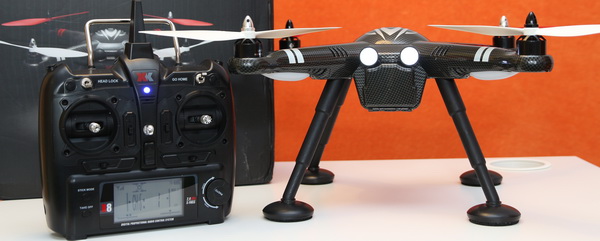
The XK DETECT X380 family has four models, the only difference being the video equipment:
- X380 – basic setup, no gimbal or camera;
- X380-A 1080P – HD Sports camera with built-in 1-axis gimbal;
- X380-B 1080P – Mobius alike camera;
- X380-C HD – GoPro-like camera with 2-axis brushless gimbal.
Already having some compatible action cameras and a cheap 2D Gimbal I decided to order from GearBest the standard model. I was very disappointed when after 4 days of posting, the parcel was returned back to China because of some “security issues”. After GB resends it to me, I will receive it in 2 weeks. I had luck with a friendly customs officer, and I didn’t pay any extra charges. He asked only what was inside the box, I said a “quadcopter“, he asked again “a kind of drone” I smiled and said Yes. After only 40 minutes of picking up my package, I finally had the X380 in my hand to review it. (it takes 30 minutes the way from the postal office to home).
XK X380: First impression
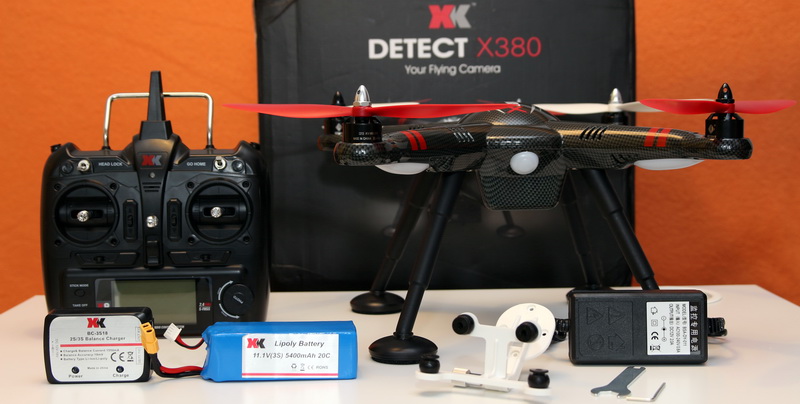
Both the aircraft’s and transmitter’s build quality is surprisingly good, with no cheap material as I expected. Everything in the box was well arranged to prevent any damages during the overseas shipment.
The airframe has a nice carbon-style painting that makes it look a bit different from other 350 mm-sized drones. Somehow, the design of the X380 tries to imitate a UFO with long landing legs.
Besides the X380 quad and its remote controller, the package contains the following:
- X380 user manual;
- 5400mAh 3cell 11.1V LI-Po battery (20C);
- Balance Li-Po charger (suitable for 2s and 3s batteries);
- 220V to 12V 2A power adapter;
- USB data cable for firmware upgrade and interfacing with ground station;
- Camera mount with dumping balls;
- 1set of propellers (2pcs CW and 2pcs CCW);
- Tools for installation of the propellers.
The aircraft comes with pre-installed landing legs, but in order to make my first fly, I had to install the propellers by myself. Both the blades and the arms of the drones are marked with the correct order of the propeller installation. Just a quick note: the white color props are for the front, and the red ones are for the back.
A big multicolor LED light in the rear of the quadcopter marks the status of the flight controller. In the X380’s user manual (page 6) there is a table that explains the meaning of all the possible color combinations (sequences). I recommend to consult this table before and during every flight.
In the front part of the airframe, there are two bright LEDs that look just like a vintage motorcycle’s headlights. The battery is loaded from the front, not from the back like as in other multi-rotors that I have. Compared to the WLTyos V303, this model has a bigger battery compartment to accept the high capacity 54000mAh Li-Po.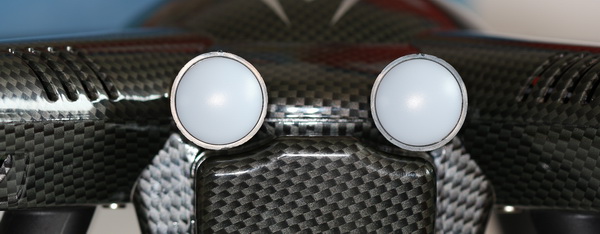
On the belly of the aircraft, four screw holes serve to secure the camera mount or brushless gimbal to the aircraft.
3 connectors on the bottom of the Quad allow feature extensions:
- micro USB connector for firmware upgrade and interfacing with ground station;
- 12v power port (JST), that allows powering up gimbals or any other extension modules like FPV transmitters;
- 3 wire Gimbal connector, GND, +5V, and control signal.
Unfortunately, there are no pin-out marks on the connectors and it is very easy to accidentally reverse the gimbal wires. Unfortunately, this usually ends with bricking the X380’s mainboard.
XK X380 review: Transmitter
The 6-channel remote controller is quite large and has a pretty professional look. By long pressing the “stick mode” button, the transmitter can be switched between mode1 and mode2 control modes. The “Take OFF” beginners-oriented button allows to easily take off and land the aircraft. To switch between regular and headless flight mode can be made by a 2-way switch that is located on the top-left side of the RC. The “Return to home” function can be activated with the second 2-way switch, which is on the top-right side.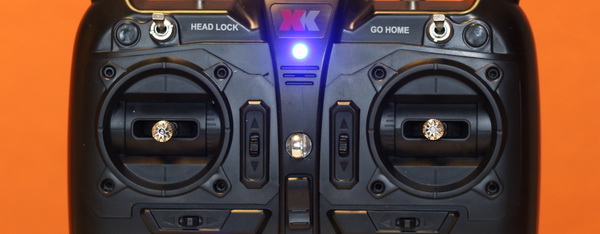
A radial dial button located on the right side near the LCD screen allows to fine-tune the gimbal’s position. Regardless of whether a 2D or 3D gimbal is installed, only one axis can be controlled through the remote controller.
XK X380: Flight performance
After I fully charged the X380’s battery and loaded 6pcs of AA batteries into the transmitter, I went out to test this bird.
To make the first flight, I proceeded with the magnetic sensor calibration. This is an essential step to prevent flyaways and crash-lands. I know these circle movements with the aircraft in your hand can be confused with some voodoo dancing by those not from the business :).
After finishing the calibration, I installed the propellers, which can be done easily and take only 2 minutes.
When everything was set up, I placed the X380 Detect quadcopter on a flat ground with a flying indicator (status LED) pointing to me, switched ON the transmitter, and I plugged in the battery’s connector. In just a few minutes, the red and yellow flashing of the status indicator was turned on to green flashing. The two green and one blank sequence mean the Quad is ready for safe flying, and it has GPS signal from more than 6 satellites. The aircraft can be armed in two ways, both sticks down to the outer position or by long pressing (at least 2secs) the “take off” button.
My maiden flight was smooth and lasted around 27 minutes with 3 takeoffs/landings. I tried only basic flight movements without testing the max altitude, headless mode or the one-key return to home function (RTH). When the green status light is changing into fast red flashing it is recommended to land a.s.a.p..
XK X380: Upgrades and hacks
You know, nothing is perfect out of the box, and we can always add some nice new features to our toys. Below you can find a list with some of my plans for the X380 Quad: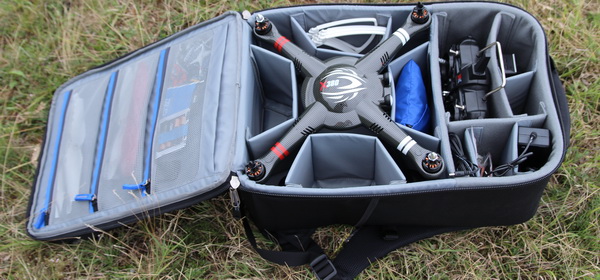
- Uploading the latest firmware with a circle hovering;
- Adding Li-Po battery to the transmitter;
- Installing 2G brushless gimbal and HD camera;
- Adding 5.8GHz FPV system (600mW TX and 7″ LCD).
Updates:
Just returned from the field after my second flight with the X380 Quad, and I was impressed by how stable was even in moderate wind. Due to this fact, I could call it “The Wind Fighter” because it easily maintained its position like a model for a photo shoot.
One motor died on my XK X380 drone, any idea where from I can get original spare parts? all I should replace all four with some compatible motors?
I’ve used your information and links pages for a while, messing about with the xk X380 drone, I’ve just recently bought a couple of these cheaply on eBay just to run as don donors and spares, while checking one out I came across this wee chip plate, ( see attached photo) it is obviously something to do with camera / gimbal but it’s wired into the mainboard, I was wondering if you recognize it and what exactly it is.
Many thanks in advance
Michael
Hey, looking for spare parts for the XK X380. Does anyone know where I can get some? I need a flight controller board and GPS module. I know that is a very old model, but still, use it with my GoPro7
I would like to learn how to increase the speed of the x380 quadrocopter and if you can make an answer in Russian
You can probably increase the speed by using a HIgh voltage LIPO, but for longer usage this can be harmful for the electronic parts as well for the motors. Other way it would be to replace the ESC with a open source one.
hi, I own this x380 camera and tonight I tried to update it and no longer works with my xk x380 drone. I’ve mounted the FPV kit in my drone but since I’ve updated it, it no longer transmits the video signal. So my question is if you can send me the firmware of this camera.
when I got my x380 FPV was fitted changed camera to AKASO 7000 no fpv saying no signal please help me.
what kind of fpv monitor did you use? the akaso camera has probably only wifi fpv…
Can anyone help please I have a XK X380B loved it untill I had a slight fall ..and now the rear led light do not come on would this be a simple replacemant or is it more seious ive sent off for a replacement led light that inicates all the gps and warnings im hopi g the new bulb solves this can anyone help regards ..Darren
Will work the XK X380 with Hubsan H109S-17 battery? Does anyone test it?
My original Li-Po is puffed and I want to replace it before something wrong happens….
My X380 does not hold a position during flight. Respond properly to commands, the LED is green, I redid the magnetic trim but do not stand still in the sky moving in a causal position. Even when I insert the returne to home is not working properly.
Can you help me fix it?
Hi David and sorry for the late reply.
My X380 died about a 2 months ago. Even after I replaced the main-board still not working correctly. It just turns over on the ground. I completely gave up this drone :(
Hello can I use 11.4V 5200mAh on my detect x380 it won’t harm the electronics on my x380?
XK 380 CD with FPV is now at a flash sale for 242$ :)
I purchased my XK Detect X380 from apunky on Ebay and he will not exchange it for me. The right rear motor will not power up without giving some additional throttle and then it stops which basically means I can’t fly it.
I replaced the motor AND the ESC with only receiving the same results. This is a new drone and I am really sad to have wasted my money. I have not connected to a computer via usb and doubt that would correct this but I am certainly willing to try most anything at this point.
Any thoughts out there?
I know there are some modifications out there to extend the range of the xk 380, they require opening up the transmitter, soldering, etc….and then your transmitter no longer looks appealing, with all those additions.
Is there an easy, effective by which we can increase the range of both the transmitter and the FPV?
Can a windsurfer/parabolic antenna be adapted to this transmitter?
My x380 has not been performing too good. It seems like the GPS is not working all the time.
Do you have the latest software and updates for this quad?
Thanks, Paulus
Will work the Hubsan’s 7000mAh Li-Po battery with the X380??
Probably the flight time will be increased to about 30 minutes, if we can fits it in :)
Great review, thanks!
I also don’t like the fact that it doesn’t have a full manual mode (without GPS).
I found another X380 review saying that this quadcopter can stay in air up to 30 minutes? If that is true, than that beats the DJI Phantom series flight time.
What is your best flight time with this XK X380?
I tried fitting the generic 2 axis gimbal to my X380 but it would not work. X380 will not turn on now.
I have checked internal board and find the small red led on receiver board is showing red, and pulsating quickly.
Have I cooked the receiver and control board, as you say by connecting the gimbal in reverse.
When I connect battery, the leds under the esc boards, flash in sequence, but the large led at the rear does not light up.
When it was flying I found it is the most enjoyable radio controlled aircraft I have ever flown.
I am 82 years of age and enjoy flying it.
Unfortunately if the status LED (big one in center) not blinks probably X380’s main board is dead. I had the same issues but I managed to replace it and now works like new :)
I recorded a video with the repair process, I will try to upload it.
I have a problem with my X380….will not start up on manual mode, but will take off. using the take off button
can you help,
thanks,
KEN