
XK Detect X380 Firmware, driver and ground station
As I’m a XK Detect X380 owner I thought it would be very useful to gather all the important files related to this quadcopter (like:firmware, drivers and tools).
I’m also planning to add to this post gimbal and FPV connection diagrams and other useful details, guides and tutorials related to the X380.
I promise that I will try to keep this post as fresh as possible with the latest updates. If anyone has something new that would like share, you can contact me and I will add it to this post.
X380 Firmware update
First off all, upgrading the quadcopter’s firmware it’s a very risky process, it actualy can brick your favorite toy. Proceed only at your own risk!
The latest X380’s firmware will add a new feature called circle hovering or FAP (Fly Around Point).
Only few steps are required to upgrade the firmware on the XK Detect X380. Before you start, make sure that the quadcopter’s battery is fully charged.
- Download the latest X380 firmware from here.
- Connect your X380 by using the included micro USB cable (No battery, transmitter OFF);
- Connect the quadcopter’s battery;
- Copy the download and unpacked firmware file into the “UPDATE” folder;
- Unplug the USB cable from the quadcopter;
- The status LED will be blinking in RED for a minute;
- Disconnect the battery.
Now you can test the new FAP feature:
- The X380 must be in standard flight mode (not in headless mode!);
- Fly over the object (building, tree, etc.) that you want to capture and hover above it;
- Press the photo key on the transmitter (the gimbal dial knob) till solid green light is shown by the status LED;
- Move elevator backwards to set the desired radius (minimum 5 meters);
- For quitting the circle hovering mode just press the photo key again.
An additional feature to the FAP mode is the Panorama mode:
- Press photo button till the status LED turns on solid green;
- Release both sticks and buttons;
- The X380 will start rotating around its axis.
BTW, the FAP mode works only with the newer transmitter (2 antennas and ensure 4 cables on the photo button).
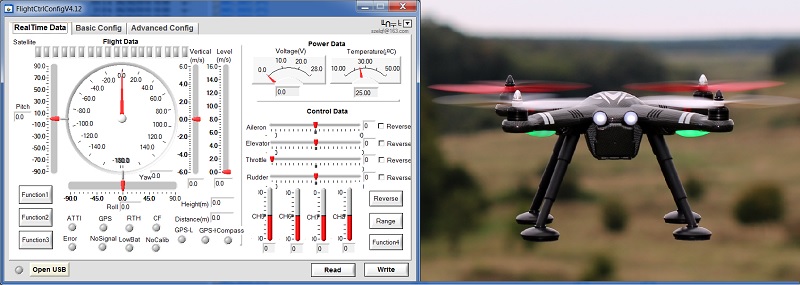
Through the ground station software (FlightCtrlConfig) a lot of parameters can be fine-tuned. For example you can increase the altitude of the RTH mode. Don’t forget to be very careful with those settings.
- Download the X380’s driver from here.
- Download the XK X380 ground station from here.
- Plug the micro USB cable into the X380’s USB port (not yet into the computer’s USB port!);
- Turn on the remote controller;
- Plug the X380′ battery;
- Plug the USB cable into the computer (if it is the first time, install the X380 driver);
- Start the ground station tool and change the language to English;
- Click on the “open USB” button.
List of all XK Detect X380 available downloads:


Updates 12.02.2015
Added latest WL380008 firmware
- FAP will be disabled if there is no or not enough GPS signal;
- Automatic decline rate during RTH or Auto Land increased from 2 m/s to 3 m/s.
Hello…
I just installed a new FC board in my x380.
Originally my x380 was the FAP panoramic version out of the box.
With the new board will I have to do anything special to have those same features again?
Thanks
Hi i think i messed up with my x380
What i done i just connect with ground station one
Nothing changed
And copy the wl 380008 file into quad update folder since my quad drifting away and bowling
Auto take off not working and if i turn on altitude mode start dancing plz any help
Gps fine
Does anyone know how to take TX signal from the flight controller?
Thanks in advance