
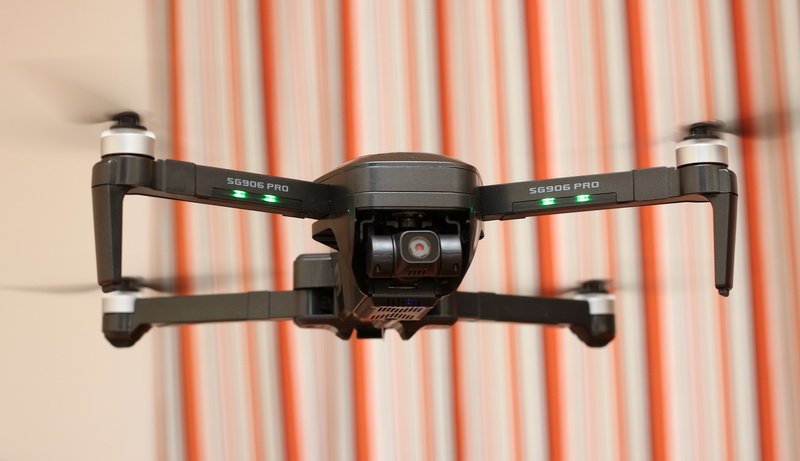
FirstQuadcopter was the first drone blog that published first rumors about the second generation ‘Beast’ drone and, now, it’s time for an in-depth ZLRC SG906 Pro 2 review. We will test the maximum flight range, top battery life, GPS accuracy, failsafe feature, and camera performance.
Compared to its predecessor, the biggest improvement of the new SG906 Pro 2 is the upgraded gimbal. While the original Beast Pro had only a 2-axis gimbal, the new model gets a 3-axis one, just like all pro-grade drones. As the new hardware requires more power, the battery has been also upgraded from 2500mAh to 3400mAh – this brings you some extra flight time too. Here, I should mention, that there was also a non-Pro version without gimbal stabilization and onboard recording. So actually, this quadcopter should be named SG906 Pro 3.
ZLRC SG906 Pro 2 features
- Compact size with foldable arms and brushless motors;
- Double Satelite positioning system (GLONASS + GPS) + Optical flow positioning system;
- Intelligent flight modes (Fail-safe RTH, Follow Surround, and Waypoint);
- 4K HDR camera with Sony IMX179 image sensor;
- Pro-grade 3-axis mechanical stabilization with PTZ control;
- WiFi real-time image transmission (5Ghz FPV);
- Up to 1200 meters control range and 800 meters FPV range;
- About 26 minutes of battery life.
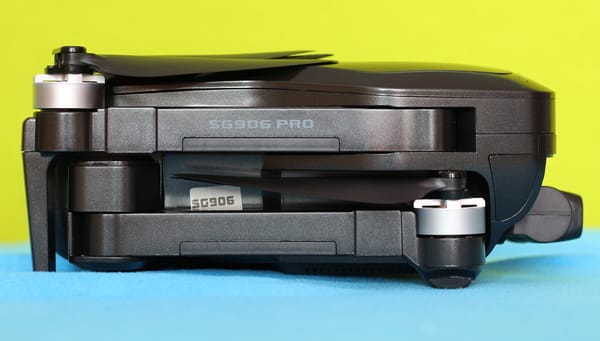
ZLRC SG906 Beast Pro 2 in-depth review
Disclosure: I received this GPS drone from RCGoing, in order to test it and make a hands-on review. Although the product was offered for free, all opinions in this article remain my own and I was in no way influenced by my partner.
The SG906 Pro 2 review will be my second cooperation with RCG. They are mainly focused on commercializing Drones, FPV systems, RC cars, and RC parts.
I received the package on my 6th day of quarantine due to being in contact with a person confirmed to have COVID-19. In my country, every direct contact needs to stay isolated at their home for 14 days. Till now, I have no sign of Coronoavirus symptoms and hope it remains this way so I can get out soon to seriously test this little ‘Beast’.
Together with the drone, I got the following accessories: transmitter, controller sticks, gimbal protector, flight battery, charging cable, and a full set of spare propellers. There are also included tons o instruction manuals in different languages. All stuff fits nicely into the included shoulder/ handbag.
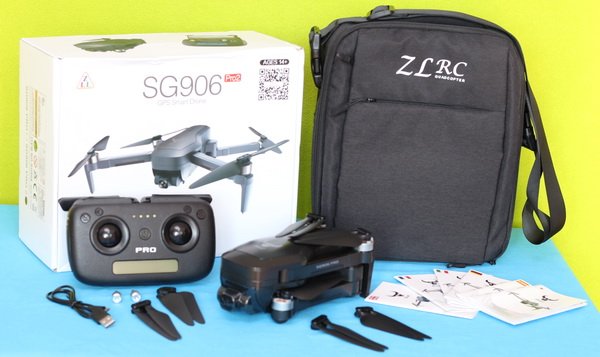
At a glance
The ‘Pro-2’ features exactly the same design as its predecessor. The only difference seems to be the upgraded gimbal, now it has 3 motors instead of just 2. With folded arms, the drone measures 17.4 x 8.4 x 7cm and weighs a bit more than half a kilo (564 grams with battery). As we are already used with the Beast series, there is a minotaur head logo on top of it.
On the belly of the aircraft, there is a tiny camera that serves as an optical flow sensor and the WiFI antenna. The power switch and charging level indicator LEDs are located on the LIPO pack.
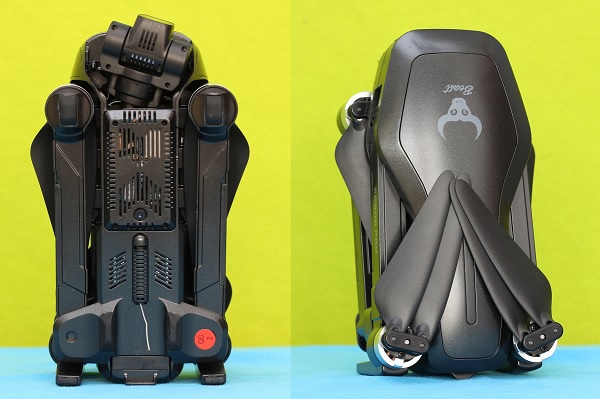
In addition to the arm lights (green on the front and red on the rear), there is a LED bar on top of the drone which is hardly visible, except in case you are piloting from a helicopter above the drone :)
The battery pack is loaded from the tail and shows the charging level when it is inserted. I was happy to find a micro SD slot on the left side. As you could read from my JJRC X16 review, phone recording kills the chance of making decent quality aerial videos.
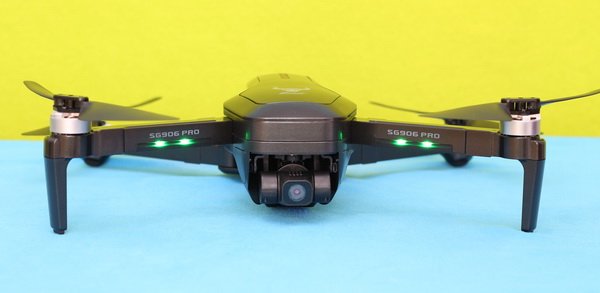
Overall built quality is good and for sure will not fall out in parts after the first flight, but to be honest, the plastic from which is made feels a bit cheapy. L3 Toys made a quite impressive SG906 Pro 2 endurance test – enjoy the video below, and please don’t try this at home :)
Price & availability
Now, you can order this 4K drone with 13% off for $154.99 – this price includes a comfortable shoulder bag. At the checkout, you can also opt for 1 or 2 extra batteries. For the ‘Fly More Combo’ pack with 3 LIPO packs, you will need to pay $206.99 (52 backs more). Purchase tip: they are offering a 10% off promo code for new customers! Note: Prior to placing your order I suggest you verify the compatibility of your phone with this drone.
SG906 Pro 2 review: Transmitter
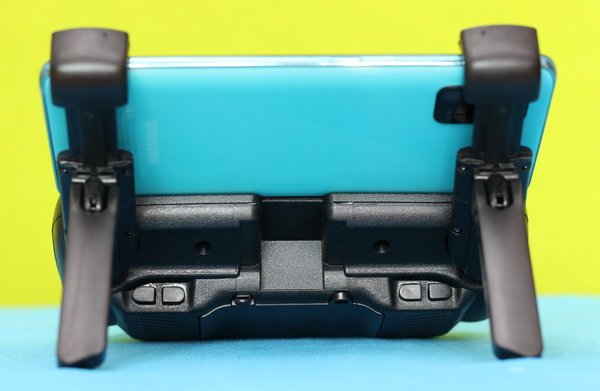
The Beast Pro 2 comes with the same nice entry-level transmitter as its predecessor’s. Many users complain that, after several uses, the removable sticks start to fall out by themselves. The transmitter has two foldable dummy antennas which servers as a phone holder and it is powered by four pieces of AA batteries.
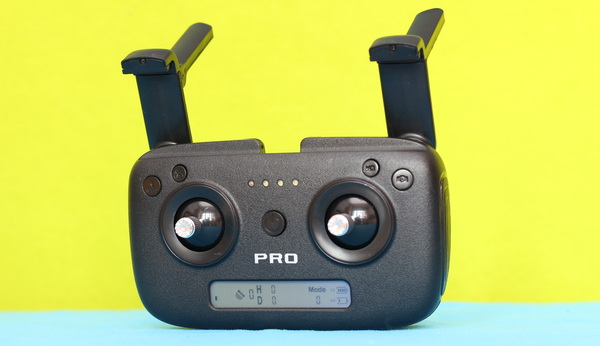
On the front panel, besides the usual controls sticks and power switch, there are 4 control buttons. From left to right, you have RTH, Speed\Calibration, Photo, and Video\GPS. By long-pressing (for 5 seconds) the ‘Speed’ button you can activate the gyroscope and gimbal level correction, by pressing for 5 seconds the ‘Video’ button you can turn On/Off GPS assisted flight mode.
At the bottom of the controller, there is a handy status LCD screen that provides real-time telemetry data such as Flight distance, Altitude, RC&GPS signal strength, and RC&Drone battery level. The ‘mode’ icon actually shows the status of the aircraft, not the stick mode on which the transmitter works. Mode 0 means no connection with drone, Mode 1 – Altitude mode, and Mode 2 – GPS mode.
Control range
The SG906 Pro-2 quadcopter is advertised with a flight range of up to 1200 meters. The maximum flight distance is wildly affected by the land shape (graves\hills), vegetation, buildings, and, of course, RF noise. Based on my experience, in an urban area, due to the many WIFI devices and high buildings, the range you find on the technical specs is drastically reduced. During my tests around my house, I got a top range of 1120 meters.
SG906 Pro 2 review: Camera
As I previously mentioned, the first SG906 was capable only for mobile recording via FPV footage. Now, the SG906 Pro 2 has both options, onboard recording on micro SD card as well as on the mobile device. Here, I should underline that digital zoom (up to 50x) works only for phone recording.
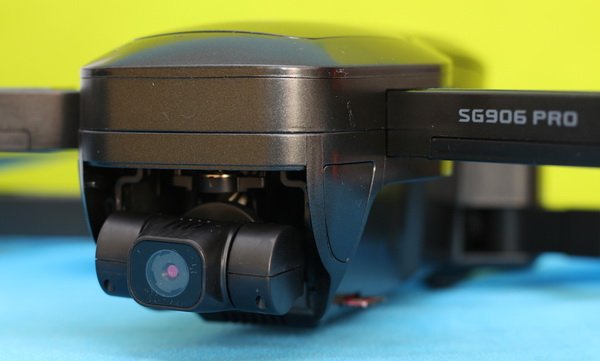
While it is advertised to be a ‘4K’ camera, it’s actually only a 2.5K camera. Videos are stored on a micro SD card with a resolution of 2048×1080@25fps and photos with 4096 x 3072 pixels. I would lie to say that image quality is perfectly stable. It has lots of jello and chaotic movements of the gimbal that makes the footage unusable for professional work. My Mavic Air 2 provides incomparable smoother videos.
Using the left shoulder buttons (Up/Down) you can change de camera’s angle from straight ahead to ground view – allowing you to take the perfect shot.
FPV quality
In order to obtain the best possible performance, I suggest turning off software image stabilization and 4k correction (upscaling). You have two modes SD (1208 x 720) and HD (2048 x 1080). The live-view has a noticeable lag and quite choppy sometimes, but still flyable. Despite that is using a standard WiFi connection, I got a usable FPV signal from about 600 meters far from me.
SG906 Pro 2 review: Battery life
While the SG906 Pro was powered by a 7.4V/2800mAh battery, the new SG906 Pro 2 has a 7.6V/3400mah battery. Curiously, despite the higher capacity, the two LIPO packs have the same size and they are probably interchangeable too. The battery pack is charged via a micro USB port. For faster refueling, I suggest using a high current rated phone charger (minim 2A).
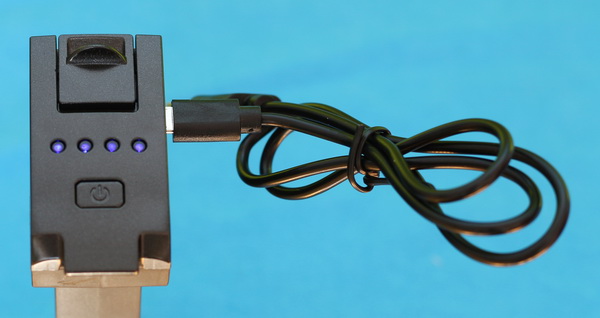
During my tests, I got an average of 21 minutes of battery life. This is 5 minutes less compared to the advertised one. In ‘high’ speed mode or windy conditions, the battery drains out even faster.
Hfun Pro APP
With a review score of just 2.9, the HfunPro can’t be considered perfect. There are many random crashes\restart reports. It also has a bug around battery level reporting, which activates auto RTH too soon.
From the main screen, you have access to the instruction manual, flight records, Calibration, and General settings (Language, Firmware upgrade, and Live-View settings).
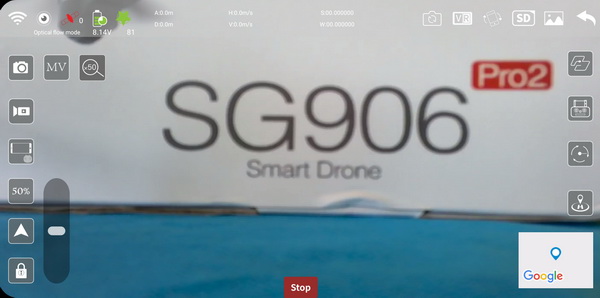
The top ribbon of the APP provides lots of telemetry data, including flight distance, cruising altitude, battery level, and signal strength. From the right ribbon, you have access to all the advanced flight modes (Waypoint, GPS Follow me, Orbit, and RTH).
SG906 Pro 2 review: Initial setup and Flight experience
Prior to power ON, make sure that you removed the gimbal protector and it is clear from obstruction. Next important thing is to perform gyro-calibration by following the steps from the HfunPro app. Firstly, you need to pick up the drone about 1 meter above the ground and rotate it anti-clockwise till the transmitter makes a beep. After that, you need to repeat the step with the drone’s nose facing the ground. In case the drone is not stable enough after take-off, land, and repeat the steps.
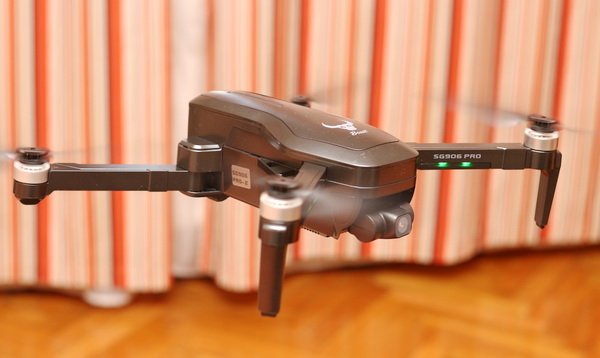
To be sure that RTH works properly, you need to wait until the ‘mode’ indicator on the controller shows ‘2’, which means that GPS positioning is active and working properly.
The ZLRC SG906 Beast Pro-2 has two-speed rates. On a ‘high’ rate, it is quite nimble and fun to fly it. Hovering stability is great even in moderate wind conditions. As a safety measurement, max flight altitude is limited to 120 meters.
More flight impressions will be added after I have completed my lockdown period.
Visitor Rating: 3 Stars
Visitor Rating: 4 Stars
Disappointing experiences of SG906 Pro 2 owners. Is the SD slot a fake more or less.
the SD card slot is real! you can insert TF card and record videos on it!
Notice that it only read a max 32 Gb card!
I am using a 128 Gb and records very nice.
I am using a 128 Gb and records very nice.
Visitor Rating: 4 Stars
Guys, can you help me?
I got this Drone and I have a Huge Delay on the image on the phone?
What could be the problem?
I tried the app FPV GO too.
Slow phone or 5GHz interferences or overheated videochip (I will try add heatsink this week there).
Sorry to say. You need a faster phone. Staying in SD mode (less data transmitting) could help. The sd-card stores in HR always.
Problem is, that video CPU is overheated. It is an older chip (IntelliChip A7 … original name Allwiner Vs3) 13x13mm without any cooling (for ‘better cooling’ is over video chip added paper sticker with spare part numbers). Try watch some time video on phone, when the drone is not flying, and then touch the drone near the bottom camera.
FYI – when I put there heating undercover (18x18x5mm), heatsing temperature is 65°C (without it was not possible to touch this chip). When drones flying, the airflow sufficiently cools the heatsink. I didn’t want to make a hole in the cover for a bigger cooler.
The ‘video pause for a few seconds’ on the phone display is disappeared. I’ll see in the summer if I need to make a hole in cover and use a bigger cooler.
This question has been asked 3 months ago, now I am asking it again. Can the camera take a raw format picture? Does anyone know the answer?
It can’t. The SG906 Pro 2 takes photos with JPG compression.
Only jpg. And better is set “4K correction” to OFF => foto is 4096 * 3072 px
With “4K correction” as ON is used some strange apps conversion to “5120 x 2880” with very blurred frames
Note:
– when is used 4096 x 3072 – on phone LCD is displayed less than is in the resulting image – all HFun apps are for toys only!
What is displayed on phone LCD, on photo will be + 1/7 left, +1/7 right and 1/3 top, 1/3 bottom.
– if is used “4K correction” as ON, then what is on phone LCD is same on photo, but in terrible quality…
Visitor Rating: 3 Stars
Visitor Rating: 2 Stars
Does anyone have experience flying the drone with VR googles?
Visitor Rating: 2 Stars
The distance display of my SG906 Pro2 is 60% of the distance calculation of Google Map. Specifically, even if the transmitter display is 1000m, it is about 600m when measured with Google Map.
How about yours?
Has anyone tried the latest version HFunPro 1.0.83?
https://apkcombo.com/hfunpro/com.hy.p/download/apk
On Google Play is still 1.0.75 only
Not yet, but thanks for the link. I will test it next weekend :)
HFunPro 1.0.86 (05. jan. 2021): https://apkcombo.com/hfunpro/com.hy.p/
GooglePlay is still old only…
It is suspicious … 1.0.83 was removed and 1.0.86 was never added. The latest version 1.0.78 is presented there now.
1.86 is in GooglePlay now. Added “some” pointer in the middle of the bottom (I didn’t fly, I have no idea if it’s the position of the drone relative to the phone). And added crashes – tap to “MV” or “VR” on LCD close app to splash app’s logo always.
1.87 – fixed crash on “VR”, but crash on “MV” still exists
I am right now experiencing with the drone as the user manual isn’t very useful. I already installed the above app but not used it yet.
Btw. Does anyone know what on the upper band VR stands for? I tried to click it but nothing happened. The same holds for the clarity, when I click either is HD (resolution) but the other position is SD?
What is a realistic distance to expect the SG906 Pro2 to travel without losing the video signal? I just got it got Christmas and love it so far.
The range is depending on the zone you fly. It could be less than 300 meters, but it could be also more than 1km…
My SG906 WiFi FPV starts locking the image at 330m. With a WiFi repeater, there is no problem with electric fences up to 1360m.
(However, this distance is not accurate, and when I calculate the distance in latitude and longitude, it is about 820m.)
My Drone doesn’t go far than 60m on the city with a line of sign… Lose signal from the radio, FPV video still working… Maybe problem or interference?
Next ‘feature’ found:
After some in the air the gimbal stops being horizontally aligned and all the slides are slightly tilted. All that remains is to land and recalibrate.
Received my SG906 Pro2 two days ago. I can say is this is a very nice drone, but the camera is only 2. It has lots of power to handle the wind and still performs very well. I would definitely recommend this drone for those who looking to get into this hobby.
First I can’t run HFunPro on my LG Stylo 3+, it just doesn’t have enough computing power. A Samsung Galaxy s8 or Huawei Honor 9 should solve the lag problem. However, FPV GO runs very well, just minus a couple of options. My problem is I cannot lock out GPS mode. I’ve tried everything. I start flying in the shadow of 3 35+ story high rises and no matter what I try to keep it in mode 1 the minute I move it out of the shadow it goes into mode 2 and stays there until I move back. Yes, I have read the instructions and do hold down the video button for 5+ seconds and it beeps. No matter what I do the controller GPS icon is always flashing. Is there a software bug in the SG906 Pro2?
OK, I’ve finally figured it out. Holding down the video button for 5 seconds does not force the toy into mode 1, it only overrides the requirement that you cannot take off without a satellite lock. If you take off in mode 1 and the toy acquires 8 satellites it automatically switches to mode 2 and you have no control over the situation. If it looses GPS lock during the flight it will revert to mode 1 again. There is no way to force this drone to stay in mode 1 if it sees enough satellites to achieve GPS lock. I fly in a garden area surrounded by three 35+ story high rises. Only at the south end can GPS lock be achieved so the toy is always switching between mode 1 and 2. This is not a situation that I like but now that I understand what is happening I’ll live with it. Still a great toy for the price.
What max size of phone/mini-tablet will I be able to fix into the remote controller mount?
It was mentioned somewhere as 6″ …
Visitor Rating: 2 Stars
We put an SD card in the drone, but after the flight, it appears the pictures/videos are ONLY on the phone.
How specifically, do you change the setting so the pictures/videos are stored on the SD card?
1 ) Do you have a card formated (as fat32)?
2 ) I think, it works as:
– if you push the button on phone => recording is stored to phone only
– if you push the button on remote controller => recording is stored to card and to phone
– unfortunately, it seems, HFanPro is not properly adjusted for GS906, because is not possible turn off recording to phone and using recording to card only. Btw – options in setting in HFanPro are for nothing – only for worse picture. I am using all as “Off”
Maybe, when there would be some very easy app for online picture to phone and all others use via remote contoller. But I did find nothing…
I read somewhere it can only handle max 32 Gb cards.
Reçu ce joujou a noel. Incapable d’associer la télécommande avec le drone.
La commande est en mode 0 et 0 satellites détectés.
Est-ce que la commande a besoin du drone pour capter les satellites ?
Le drone bip sans arret et aucunes led (des bras) ne s’allument.
Sur mon portable la wifi est connectée sur le drone mais un message “sans internet”… ?
J’ai l’impression que la commande ne dialogue pas avec le drone.
Essayé toute les manips de la notice, je commance à avoir très peur…
Serait il, HS ?
Received this toy on Christmas. Unable to associate the remote control with the drone.
The control is in mode 0 and 0 satellites detected.
Does the command need the drone to pick up the satellites?
The drone beeps continuously and none of the LEDs (on the arms) light up.
On my laptop, the wifi is connected to the drone but a message “without internet” …?
I have the impression that the command does not dialogue with the drone.
Tried all the manipulations of the manual, I start to be very afraid …
Would it be, HS?
1 ) remove the camera cover
2 ) turn on the drone (it must flash quickly)
3 ) turn on the remote controller (soon, or turn off both and repeat)
– pairing not needed any satellite
or
1) + 2), 3 ) connect to drone’s wifi and run the HFunPro app
May be – low power in drone’s battery?
– ‘without internet’ – it is OK – it is for communication drone app HFunPro (android or mac) only
Easier to turn on the controller first, then the drone. Works every time.
Hola, no puedo descargar las instrucciones del dron sh906 pro 2
Si disponen de ella en pdf les agradecería que me lo enviaran gracias
Enviado desde mi iPhone
Hi, I can’t download the instructions for the sh906 pro 2 drone
If you have it in pdf I would appreciate it if you could send it to me, thank you
Sent from my iPhone
You can download the instruction manual from here: https://www.firstquadcopter.com/download/zlrc-sg906-pro-2-beast-user-manual/
Any recommendation for Wi-Fi signal booster? Always lose the signal around 300 meters
Visitor Rating: 5 Stars
Yesterday I flew my beast pro 2 for the first time. All good excepting that the live image on the phone has a huge delay, which makes the flight difficult looking only at the FPV view on the phone….
Try FPV GO on your phone
Just to be clear… I can use an Android phone that does not have a 5G cell service activated with the SG906 PRO 2?
The Beast drone requires 5Ghz wifi for FPV (mobile app) not a 5G GSM connection!!!
Estou tentando cadastrar o meu SG906 PRO 2 na anatel e estou tendo dificuldades em achar alguns dados como; Faixa de frequência, potência máxima de saída, designação de emissores… Alguém sabe me informar
por favor???
I’m trying to register my SG906 PRO 2 with anatel and I’m having trouble finding some data like; Frequency range, maximum output power, designation of transmitters … Does anyone know please inform me ???
conseguiu? to tentando também…
got? I’m trying too …
qq coisa me manda um email:
any thing send me an email:
biancadenardo(@)gmail.com
What kind of cells are in the batteries? Mine stopped working and I through that repairing is cheaper than to buy a new Beast LiPo
Probably 4 18650 cells, new battery from Ali around 20 euro
Charge circuit might be the problem
I had a small crash yesterday, now the gimbal just vibrated without self-leveling :(
Any idea where to find spare parts for the SG906Pro2?
AliExpress
Try carefully to move the gimbal in every position (Drone switched off!). You should not feel any slight blocking. My drone seems to have a wire that got stuck or something after a crash. After this action worked fine again.
Visitor Rating: 5 Stars
Hi
anyone knows how to change an arm of this drone, I need it to keep working but I can’t find it on google.
Ty.
Try to find a 3d printer enterprise to scan another arm Perhaps It works Good Luck
I cannot seem to get the SG906 Pro to record or save pics to the onboard SD card.
The card is formatted and works well in my camera. There was something about if you record from the app, it records to the phone but I’m not even using the app, just using the record button from the controller.
Any ideas and thanks?
Try to put the SD card in Fat32 format
I have problem turn off recording to phone, although recording is in sw disabled. It seemms, sw is not adapted to GS906 drones.
For what need I store photos/videos to both – to card and to phone too – in same time ?
Wifi is then overloaded transfering phot/video to phone.
Use a 32 Gb max card!
How to increase signal (range) of sg906 Pro2 remote controller?
You can install an external wifi router antenna with high gain. This hack will allow a longer range.
how install it on a remote controller?
I tried FPV and max. cca 500m
What software is best to edit videos SG906 BEAST videos? Thanks
I use a great online app http://www.wevideo.com Takes away the need of a high performance pc to render etc.
Has anyone replaced the original 3400mAh battery with one of a larger capacity? Will it increase the flight time?
I am thinking of purchasing a beast sg906 pro 2, what are the pros and cons of this quadcopter?
The image resolution is good for the price. The 3-axis gimbal is not perfect. Videos still have some shake effect. Stills are great! Hfun app is not great but you can try ZLL RC or FPV GO instead.
Follow me modes works only with the phone and the controller SWITCHED OFF!! (took me a while to figure that out). A lot of reviews and images available on youtube. I like CAPTAIN DRONE.
About your comment on the follow me function, if both are switched off then how can you control it? I was trying to use it yesterday and it didn’t follow. It circles well though. I’ll have a look at the other apps and report back on what I find.
Visitor Rating: 3 Stars
Do you know where to buy only the SG906 PRO2 (without RC and other accessories)? I lost my drone at night and can’t find it :(
RC as spare part is cca $15 only – less than one battery price…
Try banggood.com – look for ‘sg906Pro 2’, there I saw Pro2 without any accessories (battery, bag, RC) … cca $110
Visitor Rating: 4 Stars
Visitor Rating: 3 Stars
Visitor Rating: 4 Stars
Problems:
– used very high compression for the camera !!! 9-11 for JPEG is really horrible.
All details on the photos are hand-painted. (Very serious shortcoming and therefore do not buy)
– gimbal does not work for video (you will not want to watch the recordings)
– recorded video is 2048 x 1088 … no HW player with a used Broadcom chip will play this video because FullHD is 1920 x 1080.
– the bottom camera is just a bad joke
Recent experience with Pro2 – if a low battery is reported during recording video – the whole video is dark only. After landing has battery still 3 LEDs of 4. Weird.
Video is 24,2fps – 24,7fps ! What the hell ?
hmm, it seems, the camera is a cheap camera from some mobile phone… due it not constant fps and:
– missing setup for exposition
– max. compression
I think this is somehow how is normal. get for what you pay for…
No. Photos in absolute calm – dron is home on desk – target is living room wall – 3m away, good light – are much worse than photos from cca 20-year-old children’s toy – digital camera. And that is very, very sad. Without any details, with a lot of noise.
Check this video (whatch in 1080p). I think the image quality is good for a $150 drone. Maybe a $100 phone can do the same quality, but it can’t fly :)
I am talking about photos – excuse me – are you blind? Take this drone, put it on desk and try photo 2-3m far wall with some things ( with inscriptions too) … you will see “details” :(
Everything is like “through a filter with plastic mica”. Where could I put examples? Or do you have some photo examples made with this drone?
How many GPS satellite is safe to take-off with? I don’t want to lose my Beast on the first flight…
The SG906Pro2 requires 10-12 satellites to toggle in mode 2 (GPS assited)
My SG906 Pro2 only needs 8 shown on the controller before switching to mode 2.
Has anyone found a decent parachute that doesn’t cost more than a drone? I would like to install one on my SG906PRO2 quad.
Which of these HFun Pro, GPS Drone, Zero X Force, and HFun Fly APPs will work with the Beast SG906 Pro2?
Hi,
I need some help and I hope you can help me.
I have a SG 906 Pro2 witch I am still learning to use, unfortunately it crashed and is in need of repair, namely to reattach a blue wire at the back of the camera mount.
Do you know of anyone, preferably in Canada to do this work?
Thanks for your help.
Unfortunately, the biggest problem with these relatively cheap Chinese drones is that you don’t have after-sale customer support or an authorized repair center.
IMHO, you have 3 options:
– try to repair it by yourself
– try to find a hobbyist near your location that has some experience with a drone repair
– contact the seller maybe they can handle the repair
Good luck!
Do it yourself! The repair will soon be higher than the price of a new drone. You can get all the parts you need on aliexpress. Make sure you order pro2 parts!
What’s the best $100 or so tablet that works with the SG906. I like to use big screens instead of my phone…
Is there an application other than hfun?
ZLL RC or FPV GO
HFun, ZLL RC or FPV GO … unfortunately, all are “made by HFun”.
For this drone exist no one app without HFun UAV. And it is a really big problem. I think HFun UAV apps are “anything a little working so we can sell drones” applications and “it doesn’t matter that some drones have some extra properties”.
Salve a tutti. Ho un problema di ritorno dell’immagine del video: circa 10 secondi! Premetto che il cellulare che utilizzo è un samsung s4 con connettività wifi 802.11 a/b/g/n/ac, quindi compatibile con il 5ghz. Naturalmente non sto utilizzando la app hfun pro perchè si chiude appena la avvio….
Qualcuno mi può aiutare?
Grazie in anticipo
Hello everyone. I have a problem with returning the video image: about 10 seconds! I state that the phone I use is a Samsung s4 with 802.11 a / b / g / n / ac wifi connectivity, therefore compatible with 5ghz. Of course, I’m not using the hfun pro app because it closes as soon as it starts ….
Can anyone help me?
Thanks in advance
I just lost my SG906 drone :( The right control stick did not respond and the drone just drifted away into the nearest forest. I pressed the RTH button, without any success. Take-off was in Mode 2 (GPS) with 12 satellites.
Can I buy just the aircraft and bind with my remote controller?
This is possible, please contact RcGoing customer service.
You are not the only one – the exact same thing happened to me: the right control stick stopped working.