
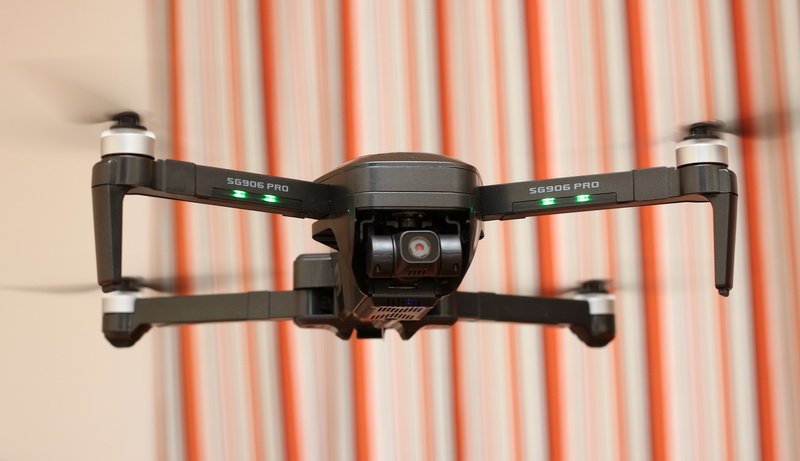
FirstQuadcopter was the first drone blog that published first rumors about the second generation ‘Beast’ drone and, now, it’s time for an in-depth ZLRC SG906 Pro 2 review. We will test the maximum flight range, top battery life, GPS accuracy, failsafe feature, and camera performance.
Compared to its predecessor, the biggest improvement of the new SG906 Pro 2 is the upgraded gimbal. While the original Beast Pro had only a 2-axis gimbal, the new model gets a 3-axis one, just like all pro-grade drones. As the new hardware requires more power, the battery has been also upgraded from 2500mAh to 3400mAh – this brings you some extra flight time too. Here, I should mention, that there was also a non-Pro version without gimbal stabilization and onboard recording. So actually, this quadcopter should be named SG906 Pro 3.
ZLRC SG906 Pro 2 features
- Compact size with foldable arms and brushless motors;
- Double Satelite positioning system (GLONASS + GPS) + Optical flow positioning system;
- Intelligent flight modes (Fail-safe RTH, Follow Surround, and Waypoint);
- 4K HDR camera with Sony IMX179 image sensor;
- Pro-grade 3-axis mechanical stabilization with PTZ control;
- WiFi real-time image transmission (5Ghz FPV);
- Up to 1200 meters control range and 800 meters FPV range;
- About 26 minutes of battery life.
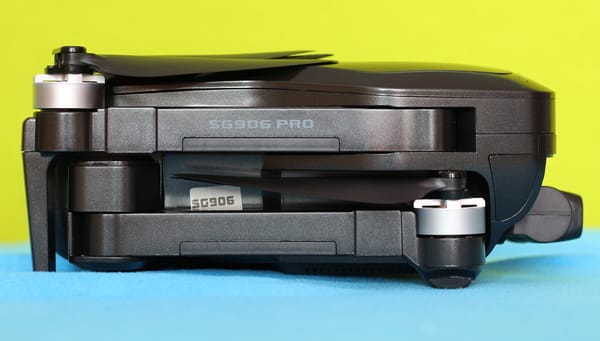
ZLRC SG906 Beast Pro 2 in-depth review
Disclosure: I received this GPS drone from RCGoing, in order to test it and make a hands-on review. Although the product was offered for free, all opinions in this article remain my own and I was in no way influenced by my partner.
The SG906 Pro 2 review will be my second cooperation with RCG. They are mainly focused on commercializing Drones, FPV systems, RC cars, and RC parts.
I received the package on my 6th day of quarantine due to being in contact with a person confirmed to have COVID-19. In my country, every direct contact needs to stay isolated at their home for 14 days. Till now, I have no sign of Coronoavirus symptoms and hope it remains this way so I can get out soon to seriously test this little ‘Beast’.
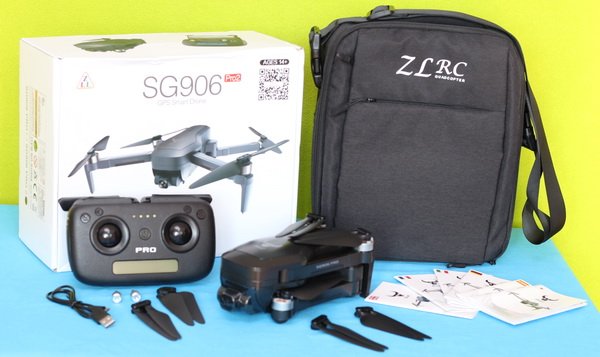
Together with the drone, I got the following accessories: transmitter, controller sticks, gimbal protector, flight battery, charging cable, and a full set of spare propellers. There are also included tons o instruction manuals in different languages. All stuff fits nicely into the included shoulder/ handbag.
At a glance
The ‘Pro-2’ features exactly the same design as its predecessor. The only difference seems to be the upgraded gimbal, now it has 3 motors instead of just 2. With folded arms, the drone measures 17.4 x 8.4 x 7cm and weighs a bit more than half a kilo (564 grams with battery). As we are already used with the Beast series, there is a minotaur head logo on top of it.
On the belly of the aircraft, there is a tiny camera that serves as an optical flow sensor and the WiFI antenna. The power switch and charging level indicator LEDs are located on the LIPO pack.
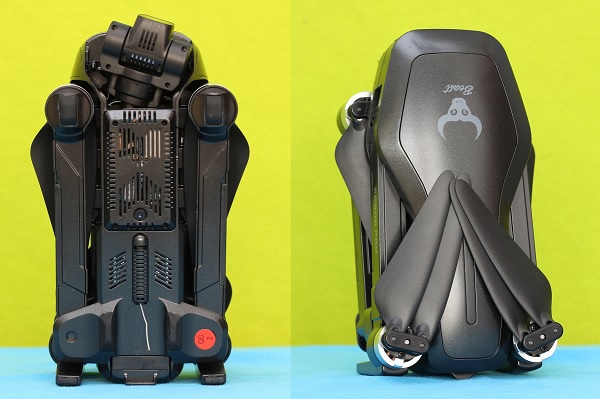
In addition to the arm lights (green on the front and red on the rear), there is a LED bar on top of the drone which is hardly visible, except in case you are piloting from a helicopter above the drone :)
The battery pack is loaded from the tail and shows the charging level when it is inserted. I was happy to find a micro SD slot on the left side. As you could read from my JJRC X16 review, phone recording kills the chance of making decent quality aerial videos.
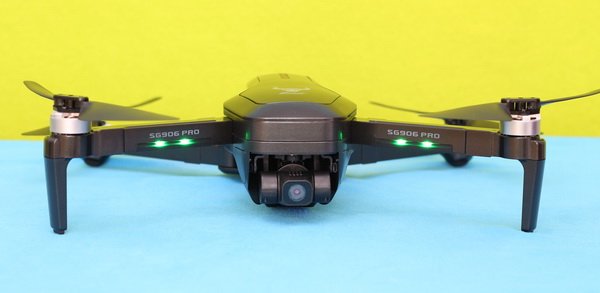
Overall built quality is good and for sure will not fall out in parts after the first flight, but to be honest, the plastic from which is made feels a bit cheapy. L3 Toys made a quite impressive SG906 Pro 2 endurance test – enjoy the video below, and please don’t try this at home :)
Price & availability
Now, you can order this 4K drone with 13% off for $154.99 – this price includes a comfortable shoulder bag. At the checkout, you can also opt for 1 or 2 extra batteries. For the ‘Fly More Combo’ pack with 3 LIPO packs, you will need to pay $206.99 (52 backs more). Purchase tip: they are offering a 10% off promo code for new customers! Note: Prior to placing your order I suggest you verify the compatibility of your phone with this drone.
SG906 Pro 2 review: Transmitter
The Beast Pro 2 comes with the same nice entry-level transmitter as its predecessor’s. Many users complain that, after several uses, the removable sticks start to fall out by themselves. The transmitter has two foldable dummy antennas which servers as a phone holder and it is powered by four pieces of AA batteries.
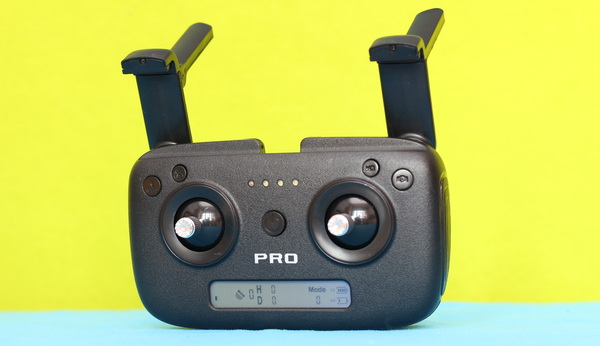
On the front panel, besides the usual controls sticks and power switch, there are 4 control buttons. From left to right, you have RTH, Speed\Calibration, Photo, and Video\GPS. By long-pressing (for 5 seconds) the ‘Speed’ button you can activate the gyroscope and gimbal level correction, by pressing for 5 seconds the ‘Video’ button you can turn On/Off GPS assisted flight mode.
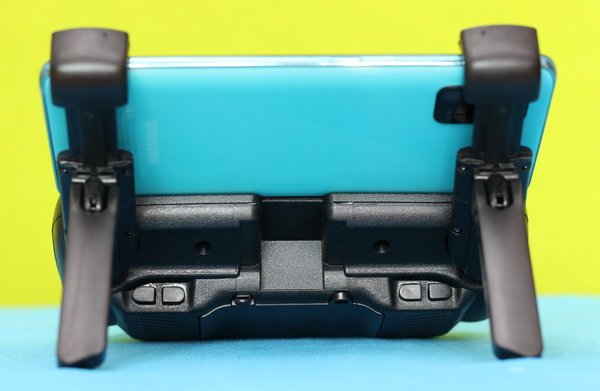
At the bottom of the controller, there is a handy status LCD screen that provides real-time telemetry data such as Flight distance, Altitude, RC&GPS signal strength, and RC&Drone battery level. The ‘mode’ icon actually shows the status of the aircraft, not the stick mode on which the transmitter works. Mode 0 means no connection with drone, Mode 1 – Altitude mode, and Mode 2 – GPS mode.
Control range
The SG906 Pro-2 quadcopter is advertised with a flight range of up to 1200 meters. The maximum flight distance is wildly affected by the land shape (graves\hills), vegetation, buildings, and, of course, RF noise. Based on my experience, in an urban area, due to the many WIFI devices and high buildings, the range you find on the technical specs is drastically reduced. During my tests around my house, I got a top range of 1120 meters.
SG906 Pro 2 review: Camera
As I previously mentioned, the first SG906 was capable only for mobile recording via FPV footage. Now, the SG906 Pro 2 has both options, onboard recording on micro SD card as well as on the mobile device. Here, I should underline that digital zoom (up to 50x) works only for phone recording.
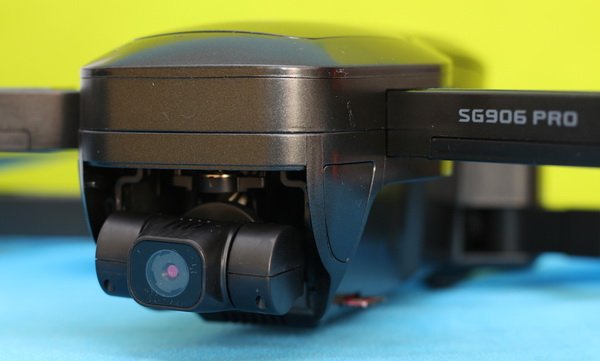
While it is advertised to be a ‘4K’ camera, it’s actually only a 2.5K camera. Videos are stored on a micro SD card with a resolution of 2048×1080@25fps and photos with 4096 x 3072 pixels. I would lie to say that image quality is perfectly stable. It has lots of jello and chaotic movements of the gimbal that makes the footage unusable for professional work. My Mavic Air 2 provides incomparable smoother videos.
Using the left shoulder buttons (Up/Down) you can change de camera’s angle from straight ahead to ground view – allowing you to take the perfect shot.
FPV quality
In order to obtain the best possible performance, I suggest turning off software image stabilization and 4k correction (upscaling). You have two modes SD (1208 x 720) and HD (2048 x 1080). The live-view has a noticeable lag and quite choppy sometimes, but still flyable. Despite that is using a standard WiFi connection, I got a usable FPV signal from about 600 meters far from me.
SG906 Pro 2 review: Battery life
While the SG906 Pro was powered by a 7.4V/2800mAh battery, the new SG906 Pro 2 has a 7.6V/3400mah battery. Curiously, despite the higher capacity, the two LIPO packs have the same size and they are probably interchangeable too. The battery pack is charged via a micro USB port. For faster refueling, I suggest using a high current rated phone charger (minim 2A).
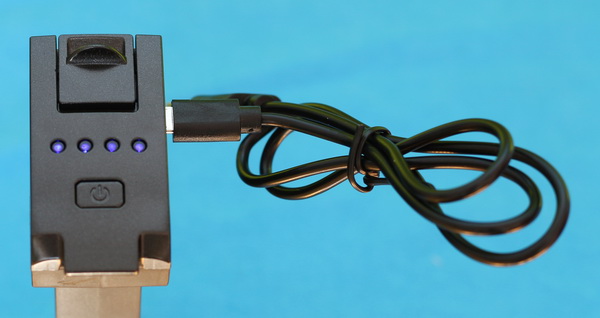
During my tests, I got an average of 21 minutes of battery life. This is 5 minutes less compared to the advertised one. In ‘high’ speed mode or windy conditions, the battery drains out even faster.
Hfun Pro APP
With a review score of just 2.9, the HfunPro can’t be considered perfect. There are many random crashes\restart reports. It also has a bug around battery level reporting, which activates auto RTH too soon.
From the main screen, you have access to the instruction manual, flight records, Calibration, and General settings (Language, Firmware upgrade, and Live-View settings).
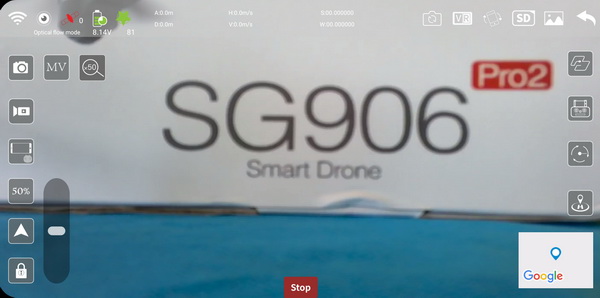
The top ribbon of the APP provides lots of telemetry data, including flight distance, cruising altitude, battery level, and signal strength. From the right ribbon, you have access to all the advanced flight modes (Waypoint, GPS Follow me, Orbit, and RTH).
SG906 Pro 2 review: Initial setup and Flight experience
Prior to power ON, make sure that you removed the gimbal protector and it is clear from obstruction. Next important thing is to perform gyro-calibration by following the steps from the HfunPro app. Firstly, you need to pick up the drone about 1 meter above the ground and rotate it anti-clockwise till the transmitter makes a beep. After that, you need to repeat the step with the drone’s nose facing the ground. In case the drone is not stable enough after take-off, land, and repeat the steps.
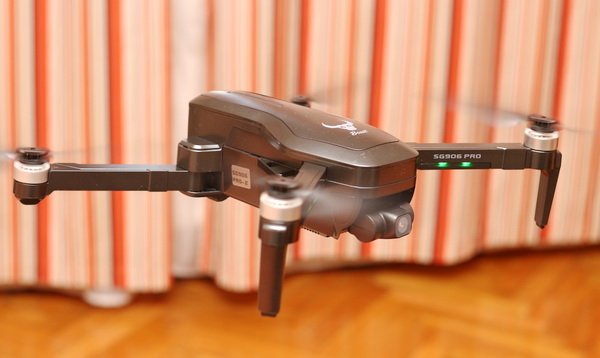
To be sure that RTH works properly, you need to wait until the ‘mode’ indicator on the controller shows ‘2’, which means that GPS positioning is active and working properly.
The ZLRC SG906 Beast Pro-2 has two-speed rates. On a ‘high’ rate, it is quite nimble and fun to fly it. Hovering stability is great even in moderate wind conditions. As a safety measurement, max flight altitude is limited to 120 meters.
More flight impressions will be added after I have completed my lockdown period.
Hello, I have a zlrc sg 906 drone and my camera quit working. Do you know how I can find a replacement camera?
Guys i am trying to record video but every 4-5 min stop recording and start from 0 scratch anyone has this issue?
Thanks
you should try with a diffrent card
I recently replaced my SG906 Pro 2 after a crash into the lake and the gimbal doesn’t respond. I cannot get the wifi to connect. At first, it connected to my phone but it won’t calibrate and the app says it is not connected so there is no calibration. When I try to calibrate by the app is says that the drone is not connected even though it is.
What is that I need to do for a new drone to the controller.
Does anyone have an Sg906 controller they wanna get rid of? My nephew lost his one. Germany area
Visitor Rating: 5 Stars
Will the 3.7v 3400mah battery work in the SG906 pro (the 2 gimbal beast) without damaging it? And is it likely that the SG906 platform will be able to have remote ID (that the FAA requires by Sept 2023)added, or will these quadcopters become illegal?
Do not use HFunPro … it is crap in last time. I am using it for calibrate only. Use FPV Go.
Kupio sam taj SG906 pro 2 i zadovoljan sam,jedino baterije od 3.400 mAh nisu baš nešta(brzo se prazne a dugo se pune) i ne mogu nikako da snimke spremam na mSD karticu,samo na tel.sprema.
I bought that SG906 pro 2 and I’m satisfied, only the 3,400 mAh batteries aren’t really anything (they discharge quickly and charge for a long time) and I can’t save the recordings on an mSD card, only on the phone.
Hello everyone,
Can anyone help me? I have a problem with the display delay on the phone. The live view is very late, so it is difficult to control the flight. These are the SG906 Pro2 drone and the HFunPro v1.1.2 program
Thanks in advance.
Has anyone experienced a seemingly unexplained reduction in flight time? I have had this drone for about 3 months now and both 3400mAh battery packs at max get 7mins of flight time each. The SG906 flew as advertised (19min) when it was fresh out of the box.
Thanks!
Visitor Rating: 3 Stars
hi 2 all
is there any update firmware available for the SG906 pro 2 ( beast ) ? or any chance to get rid from the jelly video recorded?
is there any app that could or would work better with this drone instead of the HFunpro ?
I’ll like to know where’s the product Serial number because I must register this drone in Australia before I fly to help
In the fine print of the manual in English on page 3 you will find that the network or wifi signal you see on your phone is the serial number of the drone.
When I take a photo with the SD in the drone the image freezes and I have to restart the drone. So it is impossible to take a picture on SD. Filming on SD is no problem. Does anyone recognize this problem?
Visitor Rating: 5 Stars
I am trying to enter mode 1 – optical flow (for the follow me option) with no success
it is entering to mode 2 – gps, too fast!
I turn on Remote control, then turn on the drone, then immediately after pairing I push video button and hold and after couple of seconds I hear BIP sound,
at all time of this the mode indicator is still – 1
I unlock the motor, ok
I try to take off – nothing happens, than mode change to 2 – gps
I try this so many time but no success
any idea how to get mode 1 optical flow?
how can I set that video (or picture) will be stored only on the SD card?
what is the reason for duplicates?
saving in the phone of course take data resources and wifi transfer that interferes the fpv and increase the delay of the online camera to the phone
FPV footage is stored on the phone (so data transfer is not doubled), not the actual SD card footage.
In case you lost the drone, the phone record can help you locate the crash point.
So what you are saying is that the video I see on the phone is created by recording the phone screen and not by transferring from the drone.
It is created only when I push the video record button?
Yes, the video is captured from the FPV live stream. This is why phone video has worst quality compared to SD card footage.
Hi bro,
Do you know the manufacture of sg906 pro2? please….
Shantou Chuangqi Intelligent Technology Co., Ltd. Bud without any chance contact it. They communicate with stores only…
I just got my drone and I was wondering why it won’t record to my microSD and only to my phone I had it on the SD setting while flying but I took the SD card out after the flight and there was nothing in it. What do I need to do?
did you stop recording, before powering off?
I am having the same problems. I can’t get it to record to my self card. Anyone have any idea why or how to fix the problem?
SD card must be formated as Fat32, no extFat ! Drone does not show any warning, but not recording then to card…
Hi everyone! I’m a new drone flyer with only a tiny bit of experience flying toy drones. My ZLRC SG906 Pro won’t unlock? Any idea why? Is the unlock for restricted airspace or for something else? I’m not near any restrictions from the maps I have so I’m wondering why. After calibration, I can start the engines, but the software doesn’t unlock like in the video. Any other action stops the engines. Any help would be much appreciated!
Cześć, miałem też z tym problem, ale zauważyłem, że dopóki nie przełączy się w tryb 2 – GPS, to nie ruszysz z miejsca. Też latam od niedawna tym modelem i po kilku próbach zauważyłem, że dopiero po pojawieniu się trybu 2 mogę wystartować. Czasami trzeba chwilę odczekać.
Hi, I had a problem with that too, but I noticed that until it switches to 2-GPS mode, you won’t move. I have also been flying this model recently and after a few attempts, I noticed that only after the appearance of mode 2 I can take off. Sometimes it takes a while.
If you have it in mode 1 (optical mode), you still can fly but without GPS *not recommended* (you don’t have RTH, you can’t use waypoint, even a small breeze will drift your drone). In mode 1, press and hold video record button for 5 second. After a bip, start your motors and fly.
Is there any other way of charging the batteries of the SG906 PRO2 instead of using the USB cable? It is damn slow…
You can build your own charging adapter and use a smart charger for proper and faster refuel
It is not possible to charge faster. The 5 volts are first brought to a different voltage. Whatever charger you use, it won’t go faster.
Visitor Rating: 5 Stars
My Sg906 Prov2 drone doesn’t want to start. I open it, but no sign of visible hardware failure. Any idea?
How can I reset the factory settings (parameter) of my SG 906 older version?
How can I reset the factory settings (Parameter) on my SG 906 older version
Visitor Rating: 2 Stars
I recently purchased a ZLRC SG906 Pro 2 and I need to know how to live stream from my drone? Thanks!
Sorry, it can’t live stream.
Can you fly the SG906Pro2 without a cell phone? I know you would lose some features that the app has but not quite ready to buy another phone.
Also is there some type of emergency stop? Watching videos and my instructions show a STOP on the app screen but that now appears to be labelled “Aircraft Attitude Unit” whatever that is…
Yes, you can but with limited smart functionalities.
I’m loving my new drone! It was a birthday gift from my brother. Flew for 2-1/2 batteries yesterday afternoon and went to 387ft. Easy to lose sight of it at that altitude!
I’m a keen kayaker so I’ll be using it to capture images and video from my regular kayaking trips (averaging 30km per week). I would like the security of being able to safely land on water if the need arose so am brainstorming solutions for that atm.
Visitor Rating: 4 Stars
Hello, Can anyone help me?
I have SG906 pro 2. After power on, the drone switches to mode 2.
I try to switch to mode 1 by pressing the video key continuously. And it does not pass.
What I’m doing is wrong?
do it before remote control lock on GPS, after locking to GPS you can do nothing, except turn off the drone, turn off remote, restart again.
Anyone know how to replace a motor/arm on one of these. Not sure how to take it apart to replace the motor that I just paid $30 for! 3 months old and a motor quit working.
Slip fingernails under the top outer edge and remove the outer ring from the body. Remove the top panel screws and then from underneath remove the 8 screws holding the upper and lower casings together. Separate the top and bottom and now you have access to the PCBs and arm mounting screw. You’ll need to melt the solder for the main power wires to the motor and unplug connectors. Do the reverse with the new arm and reassemble it all. It may seem scary but it’s not terribly difficult. I have a new arm to fit to mine when it arrives. Burnt out the ESC inside the arm.
Bought this drone recently, a first-time droner. It seems fairly easy to fly, have been zooming it around my back yard no problem. However, my cell phone is not 5G wifi, so I cannot get an image from the drone on it. I like the drone, am looking into picking up another phone with 5G wifi capabilities, and only use it for the Wifi, no cell phone plan or anything like that. Can you give me any ideas on what phone to look for, cheap since it will only be used with the drone? Thanks!
You shouldn’t need to get a 5G phone. Mine works fine with an iPhone 8S. Your phone wifi should pick up the signal.
The spec, 5G, is not correct. I suspect it originated with a standard Chinese-English translation. What you need to look for are the wifi specs of the phone; specifically, “802.11-ac” and “5 GHz”. It has nothing to do with 5G cellular technology.
Did you find a solution for wifi connection if so plz guide me im facing tha same problem, my whatsapp is 923462409357
Visitor Rating: 2 Stars
3 months … tilting the camera with the buttons sometimes doesn’t work and the horizontal stabilization of the gimbal died in the air yesterday.
… and salesman play dead :(
Where’s you get yours from? Because I got mine from Droneclone xperts and they have been extremely responsive and helpful. I may have paid a little more thought, I’m not sure, so I’m curious to see a difference in price if you got it somewhere else. IMO I have no issue paying more if I’m gonna get great customer service. One reason why I’ll never buy from china even though it’s cheaper
In one shop on Aliexpress. But I contacted “higher” support on Aliexpress – they intervened and shop immediately started communicate :D Meanwhile, I opened the drone and found a defect – the servo cables (lateral 45 °) were thus twisted that silicone insulation cuts and wires short and damaged gimbal for 45 ° – some “handy worker”. It seems today the shop sent me a new gimbal.
I am afraid, that this ‘timebomb’ can be in more Pro2…
New camera with gimbal and gimbal board arrived. Unfortunately, in the meantime, the gimbal board has changed – 5pin connector is only 3pin now… (this 5wires cable connecting the gimbal and videoboard board) … I am waiting for answer now …
About used microSD card:
– drone can works with FAT32 only, not with extFAT => standardly formated under Win for card 32GB extFAT only.
Lost in translation?
Cards > 32GB must be formated to FAT32 too. Dron cannot works with extFAT.
When you insert the memory card..it will easily getting hot on the lower section…
I just want to know what to choose on the phone screen….SD or HD .
If you are recording to card, use SD.
Yes, on video chip is better put some heatsing …
Can anyone tell is a sg906 pro2 the same as the sg906 pro max?
thanks!
EL PRO MAX TRAE EL SENSOR DE OBSTACULOS QUE SE LEPUEE INTEGRAR , SI LE QUITAS ESE SENSOR ES LO MISMO QUE EL PRO 2 SALUDOS
THE PRO MAX BRINGS THE OBSTACLE SENSOR THAT CAN BE INTEGRATED, IF YOU REMOVE THAT SENSOR IT IS THE SAME AS THE PRO 2 GREETINGS
Hola Anonymous, que celular recomiendas para el sg906pro? El redmi note8 nisiquiera se conecta en WiFi, actualmente lo uso sin celular y solo me ha alcanzado hasta 300 MTS,
gracias
Hello Anonymous, which cell phone do you recommend for the sg906pro? The Redmi Note8 doesn’t even connect to WiFi, I currently use it without a cell phone and it has only reached me up to 300 MTS, thanks
Has anyone tried an FPV Goggle on the SG906PRO2? There is a really nice one for 50 bucks on Amazon and I am very tempted to buy it as the phone range is terrible… Also, I changed the controller antennas and I have the problem that I lose connection from the drone to the controller (0 signal bars)! Any idea what could it be? I added two dual-band 2.4-5.8 GHz antennas
5.8GHz FPV goggles works only with compatible drones. The SG906 series features 5Ghz WIFI FPV witch is a totally different protocol!!!
are there any goggles that would be compatible with the SG906 series?
as I know there is no wifi fpv compatible goggles on the market.
you have two options for VR view:
– use box VR set for your phone (not recommended due to de delay and poor quality)
– install a 5.8G AIO FPV camera and use 5.8G FPV goggles (stable quality over a long-range)
I have a problem, can someone help me. When I turn on the drone and the remote control, I always have 0 satellites and mode 1.
It is ok – drone’s GPS module must receive an undisturbed GPS satellite signal…
When is found more than 8 (or 9) satellites on the sky, then is automatically switched to mode 2 (GPS mode).
Thank you for your reply. Okay, I know that, but after I waited for 15-20 minutes and the number of satellites was still the same (0 and mode 1). When I moved the drone the number of satellites changed to 14 and mode 2 appeared, but after that, I couldn’t do the calibration. By reigniting the drone and the remote control, the number of satellites was 0 and mode 1 again.
If you are able to find 14 satellites, the drone is ok. I don’t remember if I calibrated in GPS mode. Calibration is for set gyroscope (long press “speed” button) and geomagnetic correction (long press “Photo”) only. Then calibrate in mode 0 and after it move drone, where is GPS.
1) turn on the drone, then turn on remote controller => pairing
2) calibrate with RC
or
connect the phone to drone’s wifi and calibrate in-app
Thank you so much. I did everything you said and it worked.
Regards,
Vlade
Is anyone having problems with the drone making corrupt videos or videos that can’t be played anywhere? I tried to format the card many times and still is a problem pics or videos can’t be read by any program and it says video it’s broken or corrupt.
Please help
Video recorded to the card is not full HD, but 2048 x 1088/ cca 24p, and a lot of hw players have a problem with it. The same video is recorded to the phone, but it is 1920 x 1080/25p and there is not a problem with hw players.
Both should be playable in sw players (VLC player etc)
Corrupted video can be in slow microSD card or weak phone processor, imho
Where can I buy another three gimbal camera? I landed a little bit hard and one of the rivets came out from the back of the camera. I’ve had it about a month for the money it’s been great
I think, that it better to buy a whole new drone without any accessories (without battery, without RC … I think, I saw it on banggood.com or ali cca $115 ) than buy a spare part (camera+board cca $85 … on aliexpress).
Have you tried with other MicroSD? My 1st MicroSD was broken, I bought another one And Is working well
It could be a card adopter. I discovered that my card adopter (supplied with the package) was unable to process what was on the card. After changing it the problem disappeared.
Having trouble getting the GPS follow to work on the ZLL Beast 2. Any ideas?
Visitor Rating: 5 Stars
Visitor Rating: 4 Stars
I just received my SG906 Pro2. Do you know why the HFUN Pro crashes almost every time I m trying to switch the VR mode?
Try update to 1.87 – fixed crash on “VR”, but crash on “MV” still exists …
I hit the firmware update button in the app, now it shows version 1.0.93.
Visitor Rating: 4 Stars
I own the SG906 Pro-2 I ordered it from China and I was wondering if anybody has this problem when you press the land button for the drone to come home and land instead of responding it would go up higher and higher unfortunately it wouldn’t land does anybody have that problem with this particular drone?
Hi Manny, This is typical behavior. When pressing RTH (return to home) button. The drone first goes to a specific height. Then to the correct stored take-off GPS position and then slowly goes down. You should give it some seconds to perform this sequence. If this does not happen at all you indeed might have a malfunction.
Hey manny I’m looking to order the same drone from China how is it to fly do all the features work what else don’t you like about it
Is the SG906 Pro-2 an American made drone?